Blogger templates

Showing posts with label publish post. Show all posts

Tuesday, July 19, 2011

Blogger 'Publish Post' not working?? - We know what is Faulty!!

As you can see our Previous Article was about 'Blogger's 'Publish Post' not working?? - Solution is Here'. The Solution that i had given in that Article is absolutely correct and hence your blogger posting will work. The solution that i had provided in that article was about using the older version of blogger posting, as i had limitations for posting, i didn't use it today.

So, we have got the solution why you are facing problem with 'my publish post is not working' | 'my article is not getting auto-saved' etc.. types of reasons.

So, solution is that 'Simply don't use Google Chrome!!', yep i know this would be sounding fishy, but yes, there  is a problem with Google Chrome, so i was tired that my none of the article was working on a new blogger posting.

I tried for going with 'Mozilla Firefox'and pretty amazed that my blogger is working smooth as charm. Everything is working fine as i used to be.


So, what you must do??.  Stop, using Google Chrome for some days, as the technicians will be updating the patches for the injuries caused to Blogger, nothing wrong with the site, problem is with 'Google Chrome'.
Sunday, July 17, 2011

Blogger's 'Publish Post' not working?? - Solution is Here

Hello folks, there are almost millions of people who use blogger everyday. They blog about their unique stuff. But hell, there's some problem going on with blogger and its postings. Even i am a bounded blogger and could not resist this problem.

So i did research for 1 hour visiting to the Google Blogger Forums, even posted a thread about this problem, surprised that this was the main problem with almost all bloggers.

So the solution is here:-

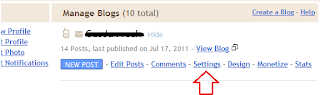
'Log in' to your blogger account, there you will see the blogs you have. Click on 'Settings', be sure that you click the settings of your blog as shown in the picture below:-

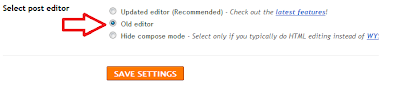
Now you need to scroll down till the last line. There you will find 'select post edior' and select 'old editor'. Get it done as shown in the image below:-

Yes, the older editor of blogger works in this condition. It only works for the 1st publish post, the 2nd time your try to edit and make changes and again publish the post, it won't work. I don't know actually whats the problem.

But for the sureness of your data, copy it to your .doc file, cause you never no something may get wrong and you may lose all data that you had typed for a long time as i lost today. :(

Thanks for reading this article, suggestions appreciated.

addthis

Twitter Delicious Facebook Digg Stumbleupon Favorites More